
AuroraMe: Northern Lights App
Adventure WalkersWeather
4.414.00 Reviews
- Version
- 1.9.2
- Installs
- 10.00K
- Age Rating
- Everyone
Screenshots
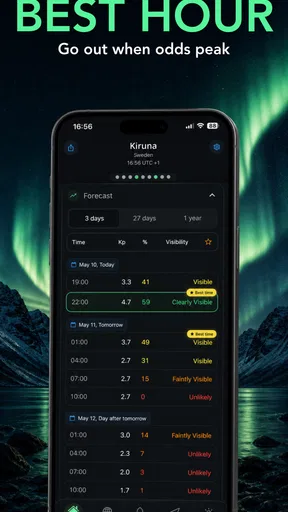
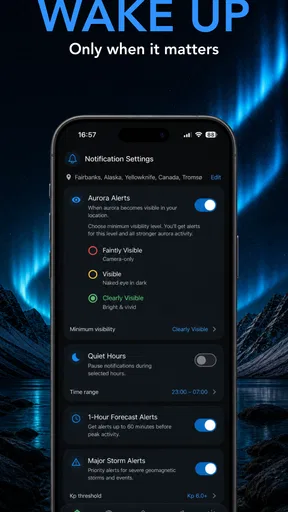
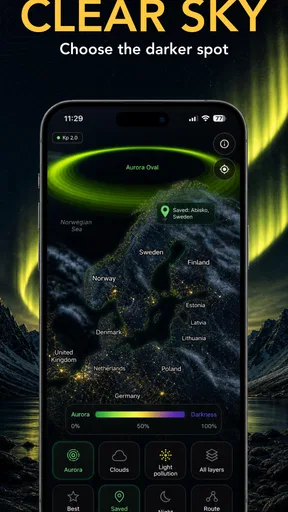
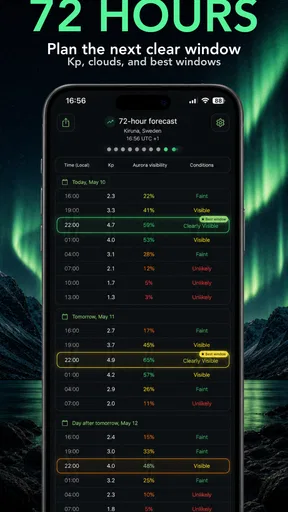
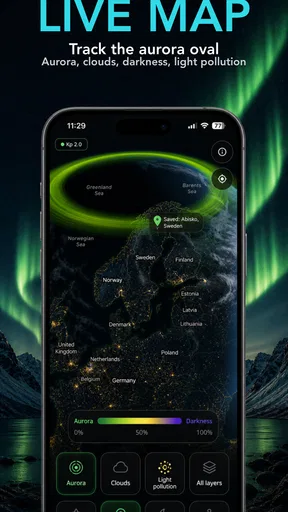
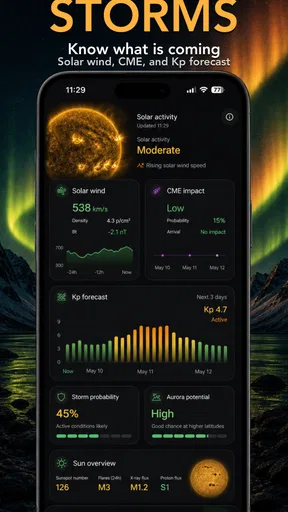
Our Review of AuroraMe: Northern Lights App
 Analysis by Appyee
When I’m deciding whether an aurora app deserves a place on my phone, I care less about dramatic promises and more about whether its forecast helps me make a sensible plan. AuroraMe: Forecast & Alerts is a free weather app from Adventure Walkers, built around the question aurora watchers actually ask: is it worth going outside, and when? It brings together the KP index, cloud cover, and the local moon, giving those separate considerations a shared place in the decision. That focus makes it more useful for planning than a general weather app alone, though it cannot turn an uncertain natural event into a guarantee.
What I would check before heading out
I’d treat any aurora forecast as a guide rather than a promise. A promising KP reading can sound exciting, but cloud cover may still make the sky hard to see; the moon is another condition worth considering when you’re judging the view. AuroraMe’s combination of these factors is the practical point: instead of letting one dramatic-looking indicator decide the evening, I can weigh several parts of the situation together.
That also helps answer a common planning question: should I leave right now, or wait? I would first check the forecast, then look at the local sky and consider how far I’d need to travel. If the cloud outlook is discouraging, a strong aurora signal might not justify a long late-night drive. If the sky is clearer, the same forecast could make a nearby, low-commitment outing feel worthwhile. The app can inform that choice, but I’d still use my judgment rather than treating a notification or forecast as a guarantee.
Where a focused aurora forecast helps
For someone who already checks aurora activity but finds it scattered across general weather screens and separate indicators, having the KP index, cloud coverage, and local moon considered together is a sensible advantage. It keeps attention on the actual viewing decision, not on weather details that may have little bearing on whether an aurora outing is worthwhile. In my view, that focused approach is especially useful for casual observers who want context without turning every evening into a research project.
A realistic use case is a weekend visit to a darker spot outside town. I’d use the app before setting off, compare the conditions with what I can see locally, and decide whether the trip is worth the effort. If the outlook is mixed, I could choose a closer place or wait for another opportunity rather than making a long journey on one encouraging number. That kind of decision-making is where a specialized forecast can be more helpful than simply opening a standard weather app and hoping it answers the aurora question.
When a general weather app may be enough
AuroraMe is not a replacement for every weather tool. If my main concern is ordinary day-to-day planning—rain on the commute, temperatures for a walk, or conditions for a trip unrelated to auroras—a general forecast app is the more natural first stop. AuroraMe makes most sense when the northern lights are the specific reason I’m checking the sky. I would also avoid relying on it as the sole basis for a costly or difficult trip: a forecast can help me compare conditions, but it cannot promise that the display will appear where I am.
There is a trade-off in choosing a specialist app. Its narrower purpose can make the relevant factors easier to focus on, but it won’t replace the wider range of information I might need for travel, safety, or everyday weather decisions. I’d check road and local weather conditions separately before driving, and I’d make sure I have a practical way to get home if the viewing opportunity does not work out. For a quick look at aurora-relevant conditions, the focused approach is convenient; for the whole trip, I’d still use other sources as needed.
Making alerts useful rather than disruptive
Alerts are most valuable when they fit the way I actually watch the sky. If I’m willing to step outside only when conditions look particularly promising, I’d keep notifications selective rather than letting every possible change interrupt the evening. If I’m already staying somewhere dark and flexible, I might be more open to checking in often. The useful habit is to decide in advance how much effort I’m willing to make, then let the forecast support that plan instead of allowing a ping to make the decision for me.
I would also keep expectations realistic about timing. An alert can prompt me to check conditions, but I’d still look outside and reassess before driving or waking someone else. That small pause matters: the best next step may be a quick look from home, not an immediate expedition. For people who are sensitive to nighttime notifications, checking the app manually before bed may be a better routine than relying on alerts, particularly if they do not want a possible aurora to interrupt their sleep.
Who is likely to get the most from it?
I’d recommend trying it if you live in, travel to, or regularly visit places where seeing the northern lights is a realistic goal, and you want a quick way to weigh aurora activity against local viewing conditions. It may also suit a newcomer who knows the KP index matters but wants to consider cloud and moon conditions at the same time. The free price makes it easy to try without committing upfront, although in-app purchases range from $5.99 to $29.99 per item, so I’d check the purchase details carefully before paying for anything.
On the other hand, if you rarely have a chance to see the aurora, need a broad everyday forecast, or expect any app to tell you with certainty that a display will happen overhead, this is probably not the tool I’d choose as my main weather app. The decision is less about whether auroras are interesting and more about whether a specialized forecast matches how often you’ll use it. Its audience is people who will act on aurora-focused information, not everyone who checks tomorrow’s weather.
How much effort does switching involve?
Trying AuroraMe does not require replacing a general weather app in my routine. I’d use it alongside the forecast I already rely on: the specialist view for deciding whether aurora conditions merit attention, and the broader app for the practical details of an outing. That parallel workflow is a low-friction way to judge whether the focused information is useful to me before changing habits or considering any paid purchase.
The app is rated for Everyone, and it has an average rating of 4.0 from 129 ratings, with 5 written reviews. It has 10K+ installs, was released on September 9, 2025, and its current version is 1.5.5. It requires Android 8.0 or later. Those details offer a little context about its availability and reception, but I would put more weight on whether its way of combining aurora and local viewing conditions fits my own plans.
Exploring the Features
First things first, let's talk about the features. Opening up AuroraMe: Forecast & Alerts, you're greeted with a sleek and intuitive interface. It’s like the app knows I have zero patience for complicated setups. The main screen provides a clear aurora forecast, which is essentially the bread and butter of the app. This forecast gives you detailed information on the probability of seeing the aurora in your location, and trust me, it’s more reliable than my local weatherman.
Beyond just the forecast, the app offers real-time alerts. Imagine getting a ping on your phone telling you to step outside because the skies are about to light up. It’s like having a friend who’s always in the know about the best cosmic events. The alerts are customizable, so you can set them to notify you based on your personal preferences, which is great because I’m not trying to be woken up at 3 AM unless it’s something spectacular.
User Experience
Using the app is a breeze. Navigating through the options feels natural, and everything is laid out in a way that makes sense. I particularly appreciated the educational section, where you can learn more about the science behind the auroras. It's like having a mini science lesson at your fingertips, which is pretty cool if you’re into that sort of thing.
The developers clearly put a lot of thought into the design. The color scheme is easy on the eyes, and the graphics are crisp and engaging. It’s clear they wanted to create an experience that’s not just functional but also enjoyable to use.
What Sets It Apart?
So, what makes AuroraMe: Forecast & Alerts stand out from other similar apps? For starters, the accuracy of the forecasts is top-notch. The app uses data from multiple sources and combines it to give you the best possible prediction. It's like having a team of aurora experts in your pocket.
Another standout feature is the community aspect. There’s a section where users can upload photos and share their aurora experiences. It’s a nice touch that adds a social element to the app. Plus, it’s always fun to see what the aurora looks like in different parts of the world.
Final Thoughts
In conclusion, if you’re someone who dreams of catching a glimpse of the northern lights, AuroraMe: Forecast & Alerts is a must-have. It's a reliable, well-designed app that makes it easy to chase the aurora. Whether you're a seasoned aurora chaser or just someone who loves a good light show, this app has something to offer. The combination of accurate forecasts, real-time alerts, and a user-friendly interface makes this app a standout choice.
So, go ahead, download it, and let me know if you manage to catch the northern lights. Happy hunting!
Verdict
Strengths of AuroraMe: Northern Lights App
- Intuitive interface for easy navigation.
- Accurate real-time weather updates.
- Customizable alerts for severe weather.
- Sleek design with vibrant graphics.
- Option to save favorite locations.
Limitations of AuroraMe: Northern Lights App
- Occasional slow load times.
- Limited offline capabilities.
- Ads can be intrusive at times.
- High battery consumption.
- Some features require premium access.
Similar Picks in This Category
View All
Weather - By Xiaomi
Xiaomi Inc.4.1

Weather & Radar Forecast
WetterOnline4.8

Weather
OneLouder Apps4.6

AccuWeather: Weather Radar
AccuWeather3.6

The Weather Channel - Radar
The Weather Channel4.6

1Weather Forecasts & Radar
OneLouder Apps4.3
Frequently Asked Questions
What features does AuroraMe: Forecast & Alerts offer?
AuroraMe: Forecast & Alerts provides real-time aurora borealis forecasts and alerts, allowing users to track the likelihood of witnessing the northern lights. The app includes customizable notifications, a detailed map of aurora activity, and weather conditions. It also offers educational content about auroras, making it perfect for both enthusiasts and newcomers.
Is AuroraMe: Forecast & Alerts available on both Android and iOS?
Yes, AuroraMe: Forecast & Alerts is available for both Android and iOS platforms. Users can download it from the Google Play Store or the Apple App Store. The app is designed to function seamlessly across different devices, ensuring a consistent user experience regardless of the operating system.
Does AuroraMe: Forecast & Alerts require an internet connection?
While AuroraMe can function with limited offline capabilities, an internet connection is necessary for real-time updates and alerts. The app relies on live data to provide accurate aurora forecasts and weather conditions, so staying connected ensures you receive the most current information available.
Are there any in-app purchases or subscriptions in AuroraMe: Forecast & Alerts?
AuroraMe offers a free version with basic features, but it also includes in-app purchases for premium features such as advanced forecasts and ad-free experience. Subscriptions may be available for users who wish to access exclusive content or enhanced functionalities, making it flexible for different user needs.
How accurate are the aurora forecasts provided by AuroraMe?
AuroraMe uses data from reputable sources like NOAA and space weather experts to offer highly accurate aurora predictions. While no forecast can guarantee 100% accuracy due to the nature of space weather, the app strives to provide reliable information by continuously updating its data to reflect changes in real-time.
